

AI Integration Quick Reference
AI Integration Quick Reference
Where It Fits
CometChatThreadHeader is a header component for threaded message views. It renders the parent message bubble and reply count. Wire it above a CometChatMessageList and CometChatMessageComposer to build a complete threaded conversation layout.
- Kotlin
- Java
ThreadActivity.kt
Quick Start
Add the component to your layout XML:layout_activity.xml

CometChatUIKit.init(), a user logged in, and the cometchat-chat-uikit-android dependency added.
Set the parent message in your Activity:
- Kotlin
- Java
YourActivity.kt
- Kotlin
- Java
YourFragment.kt
Actions and Events
Callback Methods
CometChatThreadHeader does not expose component-specific callback methods like setOnItemClick or setOnError. It is a display-only header that renders the parent message and reply count.
Global UI Events (CometChatMessageEvents)
CometChatThreadHeader does not emit its own global UI events. The parent message updates are handled internally via the ThreadHeaderViewModel, which listens for message edits, deletes, and reaction changes on the parent message.
SDK Events (Real-Time, Automatic)
The component listens to SDK events internally via its ViewModel. No manual attachment needed.Automatic: parent message changes and reply count updates reflect in real time.
Functionality
Small functional customizations such as toggling visibility of UI elements and configuring alignment.- Verify: After calling a visibility method, confirm the corresponding UI element is shown or hidden.
Custom View Slots
CometChatThreadHeader does not use the traditional ViewHolderListener pattern for view slots. Instead, it uses CometChatMessageTemplate to customize how the parent message bubble is rendered.
setTemplates
Replaces the default list of message templates used to render the parent message bubble.
- Kotlin
- Java
What this does: Replaces the entire set of message templates. The parent message bubble renders using the custom template configuration. If you pass an empty list, no message bubble renders.
addTemplate
Adds a single message template to the existing list without replacing defaults.
- Kotlin
- Java
What this does: Appends a new CometChatMessageTemplate to the existing template list. Use this when you want to support an additional message type without removing the built-in templates.
- Verify: After calling
setTemplatesoraddTemplate, confirm the parent message bubble renders using the custom template configuration.
Common Patterns
Hide reactions on the parent message
- Kotlin
- Java
Left-align all message bubbles
- Kotlin
- Java
Custom time format
- Kotlin
- Java
Hide reply count and reply count bar
- Kotlin
- Java
Advanced Methods
setParentMessage
Sets the parent message for the thread header. This is required — the component will not render without it.
- Kotlin
- Java
setTemplates
Replaces the default list of message templates used to render the parent message bubble.
- Kotlin
- Java
addTemplate
Adds a single message template to the existing list.
- Kotlin
- Java
setTextFormatters
Adds custom text formatters to the current list of formatters used in the thread header.
- Kotlin
- Java
setTimeFormat
Sets a custom time format for the parent message display.
- Kotlin
- Java
setAlignment
Sets the bubble alignment for the parent message.
- Kotlin
- Java
InSTANDARDmode, the bubble appears on the left or right based on whether the message is incoming or outgoing. InLEFT_ALIGNEDmode, all bubbles appear on the left.
Internal Access
These methods provide direct access to internal components for advanced use cases.Bubble Style Methods
Use internal access methods only when the standard API is insufficient. Directly manipulating the adapter or ViewModel may conflict with the component’s internal state management.
Style
The component uses XML theme styles. Define a custom style with parentCometChatThreadHeaderStyle in themes.xml, then apply with setStyle().
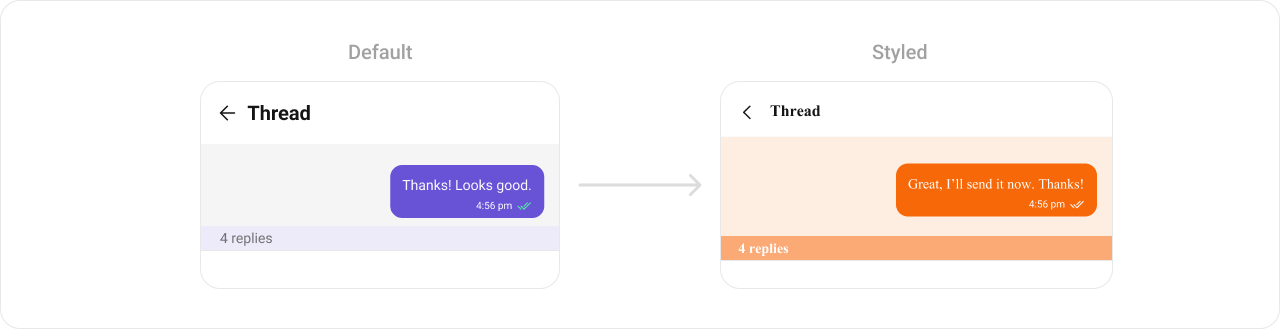
themes.xml
- Kotlin
- Java
Programmatic Style Properties
In addition to XML theme styles, the component exposes programmatic setters for fine-grained control:Customization Matrix
Next Steps
Message List
Display messages in a conversation
Message Header
Display user/group info in the toolbar
Message Composer
Rich input for sending messages
Conversations
Browse recent conversations