

CometChatConversations renders a scrollable list of recent conversations with real-time updates for new messages, typing indicators, read receipts, and user presence.
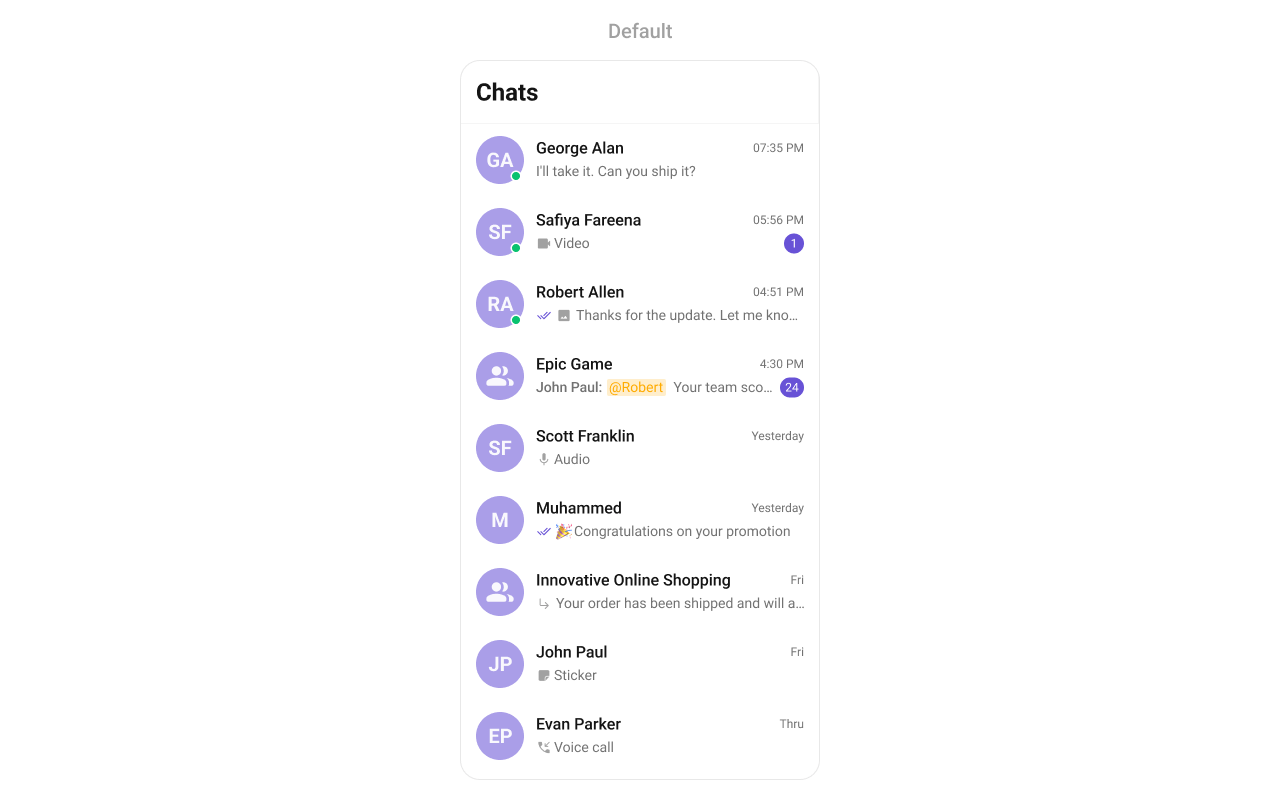
Where It Fits
CometChatConversations is a list component. It renders recent conversations and emits the selected Conversation via onItemClick. Wire it to CometChatMessageHeader, CometChatMessageList, and CometChatMessageComposer to build a standard chat layout.
- Kotlin (XML Views)
- Jetpack Compose
activity_chat.xml
See the Conversation List + Message View guide for a complete layout.
Quick Start
- Kotlin (XML Views)
- Jetpack Compose
Add to your layout XML:Or programmatically:
CometChatUIKit.init(), a user logged in, and the UI Kit dependency added.
Or in a Fragment:
- Kotlin (XML Views)
- Jetpack Compose
Filtering Conversations
- Kotlin (XML Views)
- Jetpack Compose
Pass a
ConversationsRequest.ConversationsRequestBuilder to control what loads:Filter Recipes
Actions and Events
Callback Methods
onItemClick
Fires when a conversation row is tapped. Primary navigation hook.
- Kotlin (XML Views)
- Jetpack Compose
Replaces the default item-click behavior. Your custom lambda executes instead of the built-in navigation.
onItemLongClick
Fires when a conversation row is long-pressed. Use for additional actions like delete or select.
- Kotlin (XML Views)
- Jetpack Compose
onBackPress
Fires when the user presses the back button in the toolbar.
- Kotlin (XML Views)
- Jetpack Compose
onSearchClick
Fires when the user taps the search icon in the toolbar.
- Kotlin (XML Views)
- Jetpack Compose
onSelection
Fires when conversations are selected/deselected in multi-select mode.
- Kotlin (XML Views)
- Jetpack Compose
onError
Fires on internal errors (network failure, auth issue, SDK exception).
- Kotlin (XML Views)
- Jetpack Compose
onLoad
Fires when the list is successfully fetched and loaded.
- Kotlin (XML Views)
- Jetpack Compose
onEmpty
Fires when the list is empty after loading.
- Kotlin (XML Views)
- Jetpack Compose
Global Events
The component emits events viaCometChatEvents that can be subscribed to from anywhere:
SDK Events (Real-Time, Automatic)
The component listens to these SDK events internally. No manual setup needed.Functionality
Custom View Slots
Leading View
Replace the avatar / left section.- Kotlin (XML Views)
- Jetpack Compose
Title View
Replace the name / title text.- Kotlin (XML Views)
- Jetpack Compose
Subtitle View
Replace the last message preview.- Kotlin (XML Views)
- Jetpack Compose
Trailing View
Replace the timestamp / badge / right section.- Kotlin (XML Views)
- Jetpack Compose
State Views
- Kotlin (XML Views)
- Jetpack Compose
Overflow Menu
- Kotlin (XML Views)
- Jetpack Compose
Menu Options
- Kotlin (XML Views)
- Jetpack Compose
Common Patterns
Minimal list — hide all chrome
- Kotlin (XML Views)
- Jetpack Compose
Users-only conversations
- Kotlin (XML Views)
- Jetpack Compose
Custom date formatting
- Kotlin (XML Views)
- Jetpack Compose
Advanced Methods
Programmatic Selection
- Kotlin (XML Views)
- Jetpack Compose
ViewModel Access
- Kotlin (XML Views)
- Jetpack Compose
Style
- Kotlin (XML Views)
- Jetpack Compose
Define a custom style in
themes.xml:themes.xml
Style Properties
See Component Styling for the full reference.
Next Steps
Conversation List + Message View
Build a full chat layout with this component
Component Styling
Detailed styling reference with screenshots
ViewModel & Data
Custom ViewModels, repositories, and ListOperations
View Slots
Replace specific UI regions across all components