

AI Integration Quick Reference
AI Integration Quick Reference
Message categories and types:
- message →
text,image,video,audio,file - custom → Developer-defined types (e.g.,
location,poll) - action →
groupMember(joined/left/kicked/banned),message(edited/deleted) - call →
audio,video - interactive →
form,card,customInteractive
message, custom, action, call, interactive) and has a specific type within that category.
Message Hierarchy
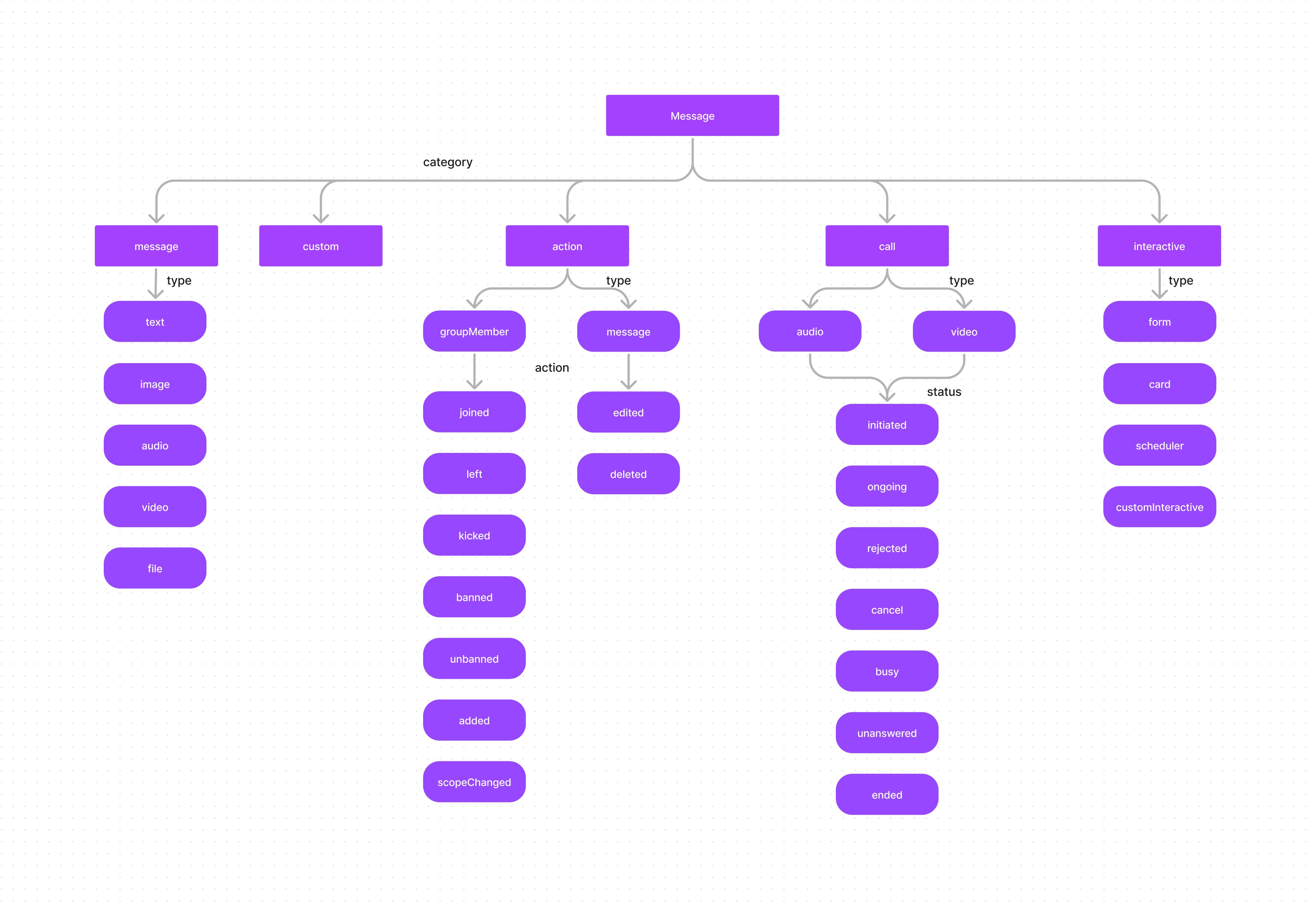
Categories Overview
Checking Message Category and Type
UsegetCategory() and getType() to determine how to handle a received message:
- TypeScript
- JavaScript
Standard Messages (message Category)
Messages with category message are standard user-sent messages:
Custom Messages (custom Category)
Custom messages allow you to send data that doesn’t fit the default categories. You define your own type to identify the message (e.g., location, poll, sticker).
Interactive Messages (interactive Category)
An InteractiveMessage encapsulates an interactive unit within a chat message, such as an embedded form that users can fill out directly within the chat interface.
See Interactive Messages for details.
Action Messages (action Category)
Action messages are system-generated events. They have a type and an action property:
Type: groupMember — Actions on group members:
joined— Member joined the groupleft— Member left the groupkicked— Member was kickedbanned— Member was bannedunbanned— Member was unbannedadded— Member was addedscopeChanged— Member’s scope was changed
message — Actions on messages:
edited— Message was editeddeleted— Message was deleted
Call Messages (call Category)
Call messages track call events with types audio or video. The status property indicates the call state:
See Default Calling or Direct Calling for implementation.
Next Steps
Send Messages
Send text, media, and custom messages
Receive Messages
Listen for incoming messages in real time
Interactive Messages
Build forms, cards, and custom interactive messages
Message Filtering
Advanced message filtering with RequestBuilder