> ## Documentation Index
> Fetch the complete documentation index at: https://cometchat-22654f5b-docs-platform-docs-release.mintlify.site/llms.txt
> Use this file to discover all available pages before exploring further.
# AI Plugin
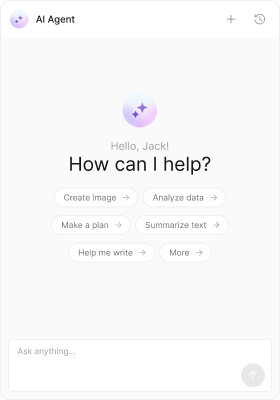
> Renders AI assistant messages including streaming responses, tool call arguments, and tool results.
| Field | Value |
| -------------------- | -------------------------------------------------------------------------------------------------------------------------------- |
| Plugin ID | `ai` |
| Package | `@cometchat/chat-uikit-react` |
| Message Types | `assistant`, `toolArguments`, `toolResults`, `run_started` |
| Message Categories | `agentic`, `custom` |
| Included by Default | No (add via `plugins` prop) |
| Bubble Component | `CometChatAIAssistantBubble`, `CometChatStreamMessageBubble`, `CometChatToolCallArgumentBubble`, `CometChatToolCallResultBubble` |
| Conversation Preview | First 80 chars of response / Tool call / Tool result |
| Context Menu | None |
## Overview
The AI plugin handles messages in the `agentic` category. It renders three types of AI-generated content:
* **Assistant messages** — completed AI responses with markdown formatting
* **Tool call arguments** — JSON display of arguments passed to a tool
* **Tool results** — JSON display of results returned by a tool
* **Streaming messages** — real-time streaming bubble while the AI is generating a response
 ***
## Installation
The AI plugin is NOT included in the default plugins. Add it explicitly:
```tsx theme={null}
import { CometChatProvider } from "@cometchat/chat-uikit-react";
import { CometChatAIPlugin } from "@cometchat/chat-uikit-react/plugins/ai";
```
***
## Message Types
| Type | Category | What it renders |
| --------------- | --------- | ---------------------------------------- |
| `assistant` | `agentic` | Completed AI response with markdown |
| `toolArguments` | `agentic` | Tool call arguments as formatted JSON |
| `toolResults` | `agentic` | Tool call results as formatted JSON |
| `run_started` | `custom` | Streaming placeholder while AI generates |
***
## Bubble Rendering
### Assistant Bubble
Renders the AI response with full markdown support (headings, lists, code blocks, bold, italic, links). Uses `CometChatAIAssistantBubble`.
### Streaming Bubble
Shows a real-time streaming animation while the AI is generating. Connects to the streaming service keyed by `chatId`. Uses `CometChatStreamMessageBubble`.
### Tool Call Bubbles
Display tool invocation details as collapsible JSON blocks. Useful for debugging AI agent workflows.
All bubble components are **lazy-loaded** — they're not included in the initial bundle until an AI message is actually rendered.
***
## Context Menu Options
None — AI messages are system-generated and have no context menu options.
***
## Conversation Preview
| Type | Preview text |
| --------------- | ------------------------------------------------------- |
| `assistant` | First 80 characters of the response (markdown stripped) |
| `toolArguments` | "Tool call" |
| `toolResults` | "Tool result" |
***
## Preloading
The AI Assistant Chat panel can be preloaded on hover/focus to reduce perceived latency:
```tsx theme={null}
import { preloadAIAssistantChat } from "@cometchat/chat-uikit-react/plugins/ai";
// Call on AI button hover
onMouseEnter={() => preloadAIAssistantChat()}
```
***
## CSS Selectors
| Target | Selector |
| -------------------- | -------------------------------------- |
| Assistant bubble | `.cometchat-ai-assistant-bubble` |
| Streaming bubble | `.cometchat-stream-message-bubble` |
| Tool argument bubble | `.cometchat-tool-call-argument-bubble` |
| Tool result bubble | `.cometchat-tool-call-result-bubble` |
***
## Installation
The AI plugin is NOT included in the default plugins. Add it explicitly:
```tsx theme={null}
import { CometChatProvider } from "@cometchat/chat-uikit-react";
import { CometChatAIPlugin } from "@cometchat/chat-uikit-react/plugins/ai";
```
***
## Message Types
| Type | Category | What it renders |
| --------------- | --------- | ---------------------------------------- |
| `assistant` | `agentic` | Completed AI response with markdown |
| `toolArguments` | `agentic` | Tool call arguments as formatted JSON |
| `toolResults` | `agentic` | Tool call results as formatted JSON |
| `run_started` | `custom` | Streaming placeholder while AI generates |
***
## Bubble Rendering
### Assistant Bubble
Renders the AI response with full markdown support (headings, lists, code blocks, bold, italic, links). Uses `CometChatAIAssistantBubble`.
### Streaming Bubble
Shows a real-time streaming animation while the AI is generating. Connects to the streaming service keyed by `chatId`. Uses `CometChatStreamMessageBubble`.
### Tool Call Bubbles
Display tool invocation details as collapsible JSON blocks. Useful for debugging AI agent workflows.
All bubble components are **lazy-loaded** — they're not included in the initial bundle until an AI message is actually rendered.
***
## Context Menu Options
None — AI messages are system-generated and have no context menu options.
***
## Conversation Preview
| Type | Preview text |
| --------------- | ------------------------------------------------------- |
| `assistant` | First 80 characters of the response (markdown stripped) |
| `toolArguments` | "Tool call" |
| `toolResults` | "Tool result" |
***
## Preloading
The AI Assistant Chat panel can be preloaded on hover/focus to reduce perceived latency:
```tsx theme={null}
import { preloadAIAssistantChat } from "@cometchat/chat-uikit-react/plugins/ai";
// Call on AI button hover
onMouseEnter={() => preloadAIAssistantChat()}
```
***
## CSS Selectors
| Target | Selector |
| -------------------- | -------------------------------------- |
| Assistant bubble | `.cometchat-ai-assistant-bubble` |
| Streaming bubble | `.cometchat-stream-message-bubble` |
| Tool argument bubble | `.cometchat-tool-call-argument-bubble` |
| Tool result bubble | `.cometchat-tool-call-result-bubble` |